More customers than ever are skipping traditional search engines and asking ChatGPT for recommendations, business hours, pricing, and policies. If you haven’t claimed your business profile yet, ChatGPT may be pulling details about your brand from old, outdated third-party websites, giving potential customers the wrong answers.
Taking control of your brand accuracy on ChatGPT is straightforward, takes only a few minutes to start, and is completely free. You don’t need an active ad account or a paid ChatGPT Enterprise plan, just your verified business details.
Why Should You Verify Your Business on ChatGPT
Before diving into the setup, here is what claiming your profile through OpenAI’s Business Hub gives you:
- Become Your Own Source of Truth: Directly edit and maintain your official business description, operating hours, contact info, website links, so ChatGPT can answer customer questions using your verified data instead of guessing from random web pages.
- Unlock First Party AI Visibility Insights: Gain access to aggregated 28 day analytics inside Business Hub, including:
- Mentions: How often ChatGPT references your website (for online businesses) or displays your storefront location (for local businesses).
- Website Clicks: Direct click through traffic coming straight from ChatGPT responses to your site.
- Discovery Topics: The broader conversation themes and customer queries where your business is surfacing.
- A Verified Blue Checkmark: Completing verification adds a blue check to your profile, signaling authenticity to users. (Note: Claiming your profile ensures data accuracy and gives you analytics, though OpenAI notes it does not artificially boost your search rankings or guarantee higher placement.)
What Information Do You Need To Claim Your ChatGPT Business Profile
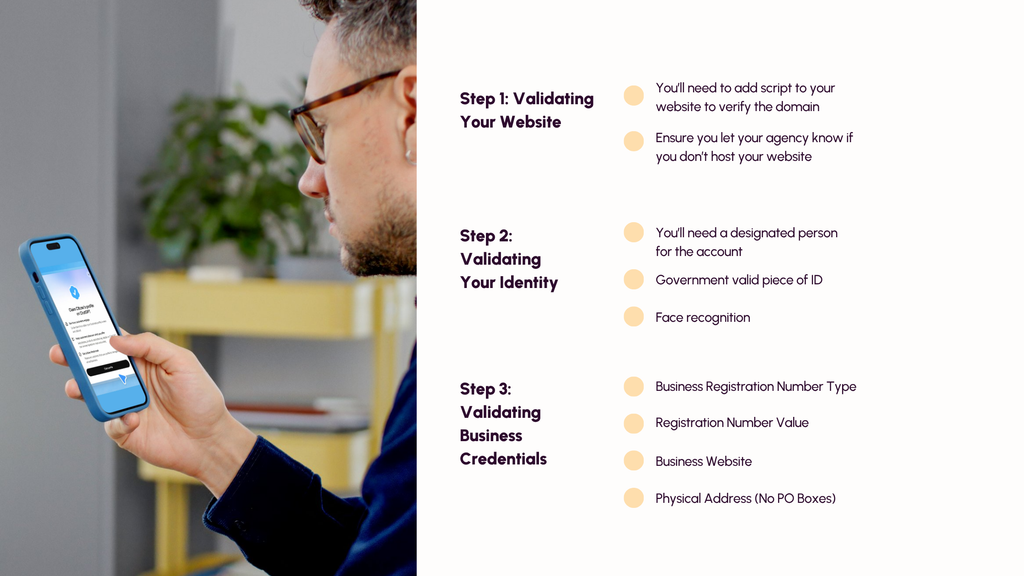
How to Sign Up and Claim Your Business: Step by Step
The setup process consists of two main stages: proving your connection to the business and completing identity verification so your edits can go live.
Step 1: Open ChatGPT Business Hub
Sign in to ChatGPT using a company-controlled account (ideally tied to a business email, since this account becomes the primary admin). Open Business Hub from the left sidebar, or go directly to [chatgpt.com/business-hub](https://chatgpt.com/business-hub).
Step 2: Search for Your Business
Type your business name or domain into the search bar and select the matching listing. (If you run an eligible online business and don’t see an existing listing, you may see an option to create a new one.) Confirm the ChatGPT account you want to use to manage the profile.
Step 3: Verify Your Connection to the Business
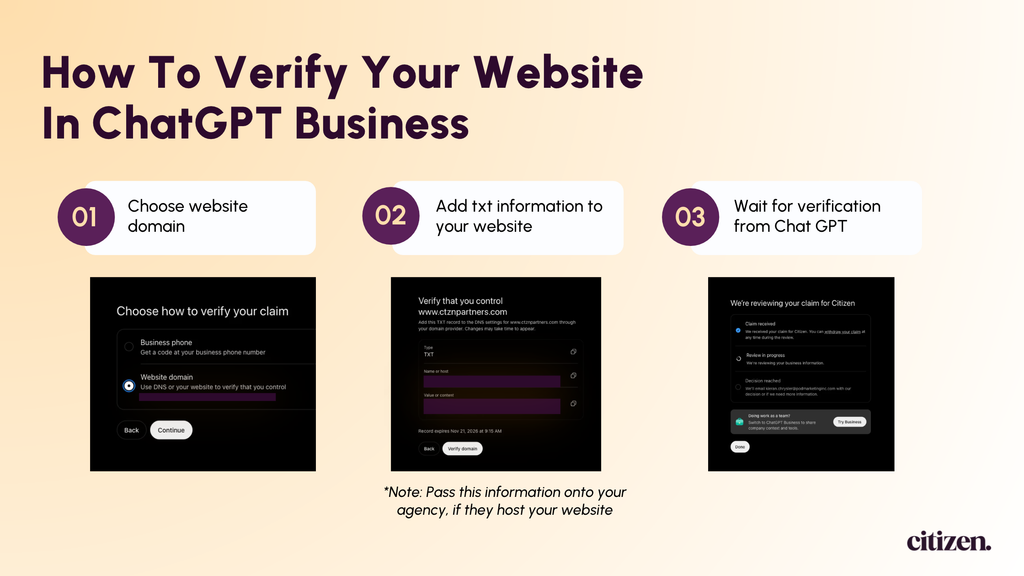
ChatGPT will prompt you to prove you are associated with the business using one of the available verification methods for your listing:
- Business Phone: Receive a verification code via SMS text or an automated phone call to your listed business number.
- Business Email: Receive a one time code sent to an official email address associated with your business.
- Website Domain (DNS): Copy the TXT record provided by ChatGPT and add it to your domain’s DNS settings (e.g., Cloudflare, GoDaddy, Namecheap), then click Verify domain.
Step 4: Wait for Initial Claim Review
Once you submit your verification method, OpenAI will review your claim and notify you via email when it is approved (or if additional details are needed).
Step 5: Complete Identity Verification via Persona
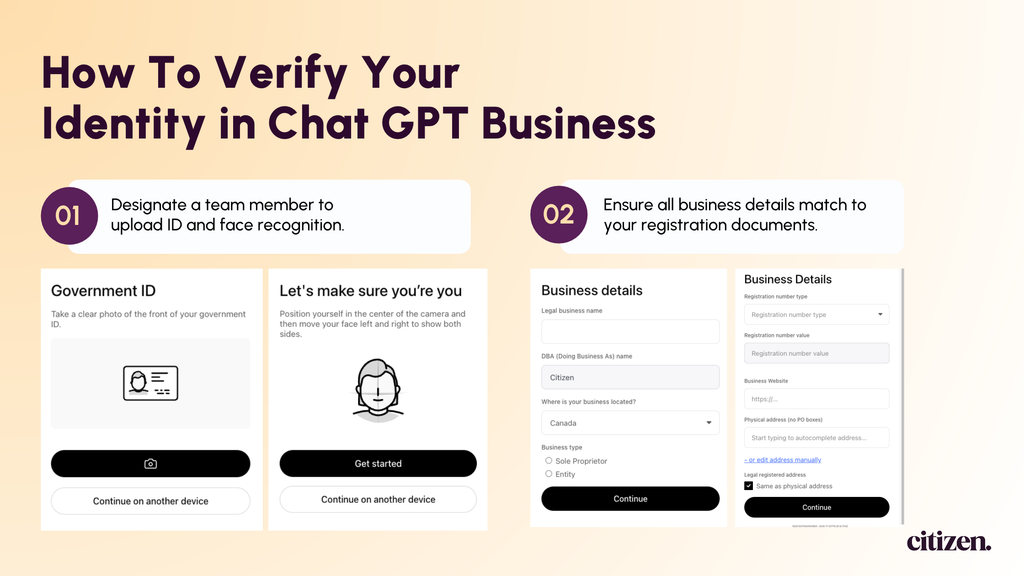
To actually publish edits to your profile, view your visibility insights, connect product feeds, or earn the blue verified badge, you must complete a second check through OpenAI’s identity partner, Persona. Have the following ready:
- A valid government-issued ID
- Official business registration details
- Proof that you are authorized to represent the business
Step 6: Update Your Profile Details
Once Persona approves your identity, head back into Business Hub to audit and update your business description, category, hours, contact info, and policies. Because OpenAI reviews edits before publishing them, it’s best to batch your updates together.
Take Control of Your AI Presence Today
Don’t let outdated internet scraps speak for your brand. Head over to ChatGPT Business Hub, search for your business, and start your free verification today.
Want more practical tips on keeping your business accurate and visible in AI search? Follow along for our latest guides and updates.
Bonus tip:
Work ChatGPT access into your offboarding process. Since it requires Government issued ID, you should always know who owns your profiles.